Go Pro
- 4.6
- Rating
- 50.00K
- Installs
- $7.99
- Price
 Analysis by App-foxy
Go is easy to describe and difficult to master: two players place stones on a board, trying to surround territory while creating strong groups and avoiding traps. Go Pro turns that ancient board game into a focused digital experience from AI Factory Limited. I found it most appealing as a quiet practice tool rather than a flashy entertainment app. It gives the rules room to breathe, which matters because the challenge comes from reading shapes, judging influence, and planning several moves ahead—not from learning a long list of complicated actions.
This is a paid board game for Everyone, priced at $7.99, and it requires Android 6.0 or later. It has been available since November 15, 2010, and its current version is 2.62. The app has built a solid audience, with an average rating of 4.6 from around 1.7 thousand ratings, alongside more than 50 thousand installs and roughly 139 written reviews. Those figures suggest a product with a dependable niche, although the price makes it worth considering carefully if you are only curious about Go.
How clearly the board supports different ways of playing
I find the board easiest to approach when I treat each move as a choice about both the local position and the wider game. That perspective helps me notice how a stone can support a nearby group while also influencing open space elsewhere. The next section looks at how this balance shapes practical play, especially when a tempting move solves one problem but creates another.
You May Also Like

 Blood Strike: 2.5 Anniversary
Blood Strike’s Loadouts Turn Every Drop Into a Tactical Gamble
A close look at Blood Strike’s custom loadouts: how fast access to signature weapons reshapes its battle royale rhythm, rewards preparation, and narrows the gap between fights.

 Pandora - Music & Podcasts
Pandora’s Music Is Easy to Start, but Harder to Recover
Pandora’s strength is its low-effort path from a seed to a station. Its weak spot is how much confidence it asks you to place in connection, setup, and quiet recovery.

 8 Ball Pool
 Is Built on Rivalries, Rematches, and Routine
A close look at the rivalries, rematches, shared routines, and unanswered safety questions that turn a quick pool match into a persistent mobile community.

 Samsung Music
’s Quiet Strength Is Playing What You Already Own
Its reach comes less from spectacle than from dependable access to a personal library. That simplicity is both the app’s strongest retention engine and its ceiling.

 AccuWeather: Weather Radar
AccuWeather Review: A Quick, Clear Forecast for Everyday Decisions
For everyday plans, the best forecast is the one you can understand quickly. AccuWeather makes rain timing, radar, and local conditions easy to act on, with a few trade-offs.

 Hill Climb Racing
Why Hill Climb Racing Still Turns Crashes Into One More Run
A tiny car, a bumpy hill and one more upgrade: Hill Climb Racing keeps resurfacing because its simple chaos makes every near-miss feel personal.
More From Our News Desk
View All News


Readability and navigation on a small screen
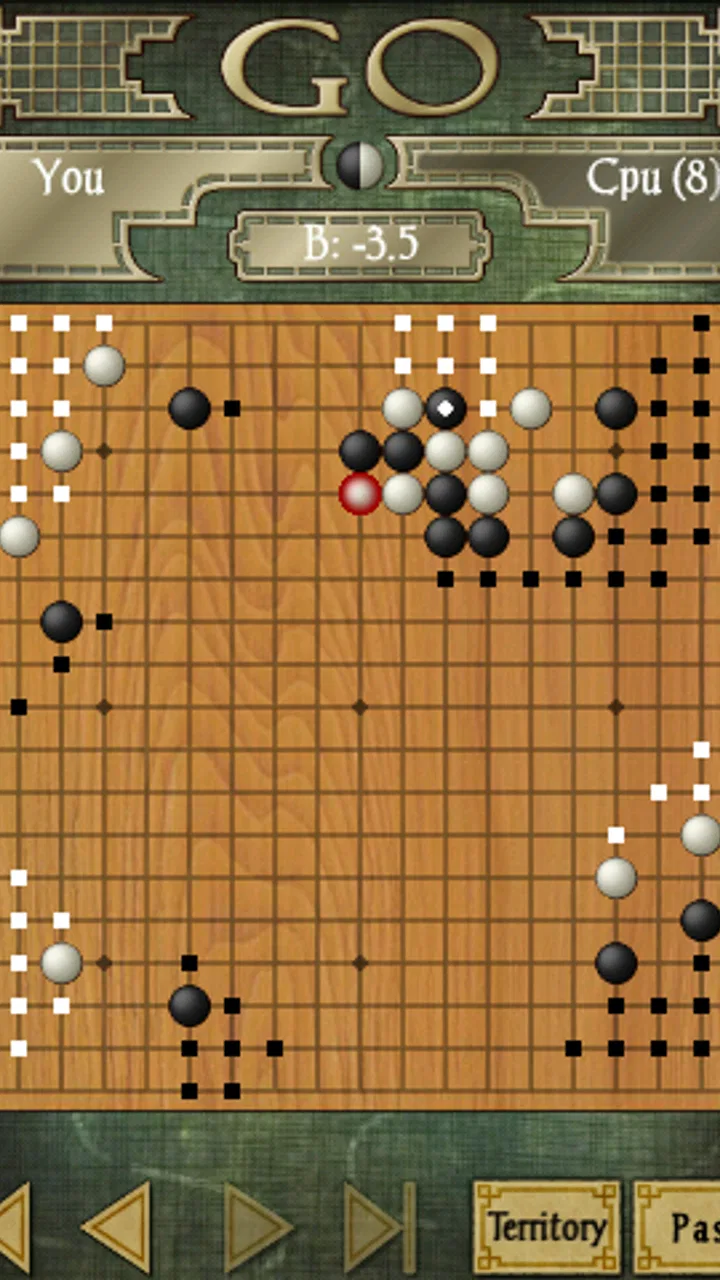
The central strength of the experience is its directness. A Go board does not need menus competing with the play area, and the app’s purpose is immediately understandable once a game begins. That simplicity is useful for people who prefer a clean interface, including players who become distracted or overwhelmed by busy presentation. I can concentrate on the stones, the open intersections, and the developing groups without feeling that the game is trying to entertain me between turns.
At the same time, Go is visually demanding. The board contains many similar-looking intersections, and a position can change meaning because of a single stone. On a phone, the smaller display can make distant groups harder to compare quickly. I would be more comfortable studying a complicated position on a larger screen than making every important decision on a compact handset. This is not a flaw unique to the app, but it affects whether the experience feels relaxed or tiring.
New players should expect the first few sessions to involve visual learning. The rules are simple, but the board is not immediately intuitive. I recommend starting with short games and deliberately pausing before each move. That habit makes it easier to identify liberties, notice groups in danger, and understand why a move that looks attractive may actually give the opponent an advantage.
Navigation is best approached as part of a calm routine rather than as a rapid competitive interface. I prefer setting up a game when I have enough attention to inspect the whole board. If I am checking my phone between other tasks, I am more likely to miss a distant threat. That makes the app suitable for deliberate practice, but less suitable for people who want a quick, low-attention pastime.
Learning the board without being rushed
Go Pro works for someone who already knows the basic rules and wants a convenient opponent. It can also suit a beginner who is willing to learn by playing, though I would not treat the app alone as a complete teaching course. The game’s depth becomes clearer after you understand why stones connect, when a group is alive, and how territory differs from temporary influence. Without those ideas, early losses can feel mysterious rather than instructive.
One useful workflow is to play with a single learning goal. In one game, I might focus only on keeping groups connected. In another, I might watch how quickly a local fight expands into a larger board problem. This is more productive than trying to remember every mistake at once. After the game, I can mentally replay the turning points and ask whether I responded to the opponent’s move or simply followed my own plan.
That approach also helps players with different levels of experience share the same device. A stronger player can explain a position using the board itself, while a newer player can take time to recognize patterns. The app is therefore more useful in a family or study setting than its solitary presentation might suggest, provided both people are comfortable discussing the position without needing a heavily guided tutorial.
Motor and sensory considerations during play
Go generally requires fewer rapid gestures than action games. A player can consider a move, select an intersection, and continue at a measured pace. That makes it potentially comfortable for people who find fast tapping, repeated swipes, or time pressure difficult. The turn-based structure also gives me room to reposition my hand and approach the screen carefully before committing to a move.
However, precise touch still matters. Selecting the intended intersection can be awkward when several nearby points are important, particularly on a small display or for anyone whose hand control varies. A mistaken placement is especially frustrating in Go because one stone can affect the entire game. I would recommend using the largest comfortable screen available and playing with the device held steadily rather than trying to make moves while walking or carrying something.
The visual contrast between stones and board is central to the experience, but the board can become mentally dense as the game develops. Players with reduced vision may find it difficult to distinguish groups that are close together, even when individual stones are visible. Players sensitive to visual clutter may prefer short sessions with breaks. The lack of fast animation is helpful here, since the app does not depend on flashing effects or constant movement to communicate progress.
For players who rely on audio rather than visual information, the game is a more limited choice. Go positions communicate their meaning spatially, so sound alone cannot replace the board. I would not choose it expecting an audio-first experience. It is better suited to someone who can access the board visually and is comfortable interpreting a dense arrangement of similar objects.
Situational access in ordinary daily use
The best everyday scenario is a quiet break at home. I can play a game after dinner, stop to think about a complicated corner, and return to the position when I have enough concentration. It also fits a commute or waiting room when the device is stable and the surroundings are not too distracting. The absence of a need for rapid reactions means the game can be approached at a personal pace.
That does not mean every short break is suitable. A game of Go can demand sustained attention, and a noisy environment makes it harder to compare distant groups. If I am waiting for an appointment and expect to be interrupted, I would choose a simpler puzzle instead. A missed move in Go is not merely a momentary lapse; it can alter the strategic balance several turns later.
The app is also a reasonable companion for in-person learning. Two people can look at the same board and discuss candidate moves, making it useful for a casual introduction to Go. Still, the phone format is less comfortable for several observers than a physical board. If a group wants to teach a lesson, a larger board or shared display may communicate shapes more clearly.
For travel, the paid format is appealing because it avoids the feeling of browsing a crowded service full of unrelated distractions. I can open a dedicated game and focus on the position. The trade-off is that players seeking a large online community, instant matchmaking, or a social ladder may find a specialized Go service more appropriate. Go Pro feels like a personal board-game application, not a broad competitive network.
Where it compares well with usual alternatives
Compared with a physical Go board, the app is easier to carry and less demanding to set up. I do not need to find space for stones or worry about pieces moving when the table is bumped. That convenience is valuable for solo practice. A physical board remains better for teaching groups, sharing a position with several people, and developing a tactile sense of the game.
Compared with free mobile board games, the $7.99 purchase requires more commitment at the start. That can be a disadvantage for someone who has never played Go and only wants to test the rules. On the other hand, a focused paid app can be preferable to a free alternative if you dislike advertising, distractions, or systems built around constant engagement. The important question is whether you want a dedicated board game or a broad online platform.
Compared with playing against a human, an app offers convenience and consistency. I can practice when another player is unavailable, repeat the same kind of opening idea, and use a quiet session to build patience. Human opponents are better at conversation, encouragement, and adapting explanations to my confusion. For serious improvement, I would combine the app with real games or instruction rather than expecting an automated opponent to replace every form of feedback.
Practical trade-offs before paying
The purchase makes the most sense for three kinds of people: players who already enjoy Go, beginners who specifically want a dedicated way to practice, and board-game fans who value a quiet single-purpose experience. I would hesitate to recommend it to someone who wants immediate excitement, a cinematic presentation, or a large social layer. The rules may be elegant, but the game asks for patience before it becomes rewarding.
Another trade-off is the difference between learning the rules and learning the game. Go Pro can provide a place to apply ideas, yet the app will not automatically make a beginner understand why a move failed. I get more from it when I keep a simple mental note after each session: where did a group become weak, when did I play too close to an opponent, and which local fight distracted me from the whole board? Those questions turn play into practice.
The app’s age rating of Everyone makes it suitable in principle for a broad range of players, but suitability still depends on attention, vision, and comfort with touch controls. A child may understand the capture rule quickly but struggle with the strategic scale of the board. An older player may enjoy the unhurried pace but prefer a larger display. The rating describes the content, not the ease of access for every individual.
Remaining barriers for inclusive play
The biggest barrier is the board itself. Go uses a visual language of spacing, connection, territory, and shape. If the player cannot comfortably inspect the complete position, the game becomes difficult regardless of how simple the rules sound. This is especially noticeable late in a game, when many stones create clusters that must be read together.
Touch accuracy is another concern. A player who has difficulty tapping small targets may need a larger device or a careful playing position. I would avoid using the app while moving, on a crowded train, or in any situation where an accidental touch is likely. The game rewards deliberate input, so the physical conditions around the screen matter more than they do in a casual guessing game.
Attention and fatigue also deserve consideration. Because Go has no obvious visual endpoint after every move, a player may continue thinking long after concentration has dropped. I find it better to stop at a natural point than to force a tired session. Shorter games and focused goals can reduce that burden, but they do not remove the need to read the whole board.
Finally, the paid entry point may exclude people who are simply exploring. If cost is the main concern, trying Go through a free physical set, a library group, or another introductory option may be wiser before buying. If the player already knows that they enjoy the game and wants a portable, dedicated version, the price is easier to justify.
My inclusive verdict
I see Go Pro as a thoughtful, compact board-game experience for people who want to play Go without carrying a physical set or depending on another person being available. Its calm pace supports careful decision-making, and its focused nature will appeal to anyone who prefers substance over visual noise. The product is strongest when used as a personal practice board: open it, study the position, make a considered move, and learn from the consequences.
I would recommend it to a friend who already understands the attraction of Go or is prepared to spend time learning its visual language. I would not recommend buying it blindly for someone seeking a quick casual game, audio-led access, online social competition, or a heavily guided beginner course. Those needs point toward a different format or a combination of tools.
My practical advice is to use the biggest comfortable screen, play in a stable and reasonably quiet place, and set one learning objective per session. Those small choices make the board easier to read and reduce the frustration caused by rushed taps or tired decisions. The most inclusive way to approach this game is to adjust the playing situation to the person, rather than expecting the same screen and pace to suit everyone.
For me, the lasting appeal is the contrast between the app’s simple presentation and the depth of the decisions inside it. AI Factory Limited has chosen a restrained format that lets the board remain the focus. That will not satisfy every mobile player, but for the right audience it creates a portable space for concentration, reflection, and gradual improvement. As a dedicated Go game, it earns a recommendation—with the clear understanding that accessibility here depends as much on the player’s visual and motor comfort as on the elegance of the rules.
FAQs for Go Pro
01What is GoPro, and what can I use it for?
GoPro is a camera and companion app designed to help you control compatible GoPro cameras, transfer footage, edit clips, and share photos or videos. During testing, the app was especially useful for previewing shots remotely, changing camera settings, creating quick highlight videos, and organizing captured content. Its usefulness depends on owning a supported GoPro camera, since many of the main features are limited or unavailable without one.
02Do I need a GoPro camera to use the GoPro app?
You can install and explore the GoPro app without a camera, but its most important functions require a compatible GoPro device. Connecting a camera allows you to use your phone as a remote control, view a live preview, adjust recording options, download media, and update firmware. Some editing, viewing, or subscription-related features may work independently, but the app is primarily intended for GoPro owners.
03Is the GoPro app free, or does it require a subscription?
The GoPro app can generally be downloaded for free, but some services and advanced benefits may require a paid GoPro subscription. Depending on the current plan and region, subscription features can include expanded cloud storage, automatic media backup, premium editing tools, discounts, or camera replacement benefits. You should review the latest pricing, trial terms, and renewal conditions before subscribing.
04Can I edit and share videos directly from GoPro?
Yes, the app includes tools for trimming clips, selecting highlights, creating short videos, adding music or simple adjustments, and sharing content to social networks or messaging apps. In testing, it was convenient for quick edits made on a phone, although professional users may still prefer desktop software for detailed color correction, advanced timelines, and precise audio work. Export time also depends on video resolution and phone performance.
05What permissions and phone requirements does GoPro need?
GoPro typically needs permissions such as Bluetooth, Wi-Fi or local network access, photo and video storage, and sometimes location services to connect reliably with a camera and manage media. A reasonably modern Android or iPhone is recommended, particularly for high-resolution footage and editing. Make sure your phone has enough free storage, a stable wireless connection, and an updated operating system for the best experience.
Pros
- Excellent image stabilization for smooth action footage
- Waterproof design makes it suitable for swimming and outdoor adventures
- Compact
- rugged body is easy to carry and mount
- Wide range of mounts and accessories expands shooting options
- High-resolution video captures detailed photos and footage
Cons
- Premium camera and accessory prices may be expensive
- Battery life can drop quickly when recording at high resolutions
- The small screen can make framing and menu navigation difficult
- Long recordings may cause the camera to heat up
- Advanced editing features may require a paid subscription

Go Pro
Gallery